

Pick what you service
Set up for the kind of shop you run.
Tell us what you service when you sign up: cars and trucks, bikes, motorcycles and ATVs, motorhomes and trailers, boats, or machines. Your shop gets the asset forms, Jobs, checklists and service recommendations written for that kind of work, not a generic list.
Vehicles in FlameTech
Jobs and service recommendations by make, model and year, due at today's mileage.
A concern at check-inEngine making grinding noise when starting. Check engine light on for 2 weeks.
- Scan the VIN and the vehicle is on file in seconds
- See what’s due at today’s mileage before you quote
- Recommend by make, model and year, not a generic list
Bikes in FlameTech
Tune-ups, safety checks and service schedules written for bikes, not adapted from cars.
Unit typesRoadMountainGravelHybridCity / CommuterCargoKidsBMXCruiserCyclocrossFoldingRecumbentTandemTricycleOther
A concern at check-inRear brake rubs and the chain skips under load. Creak from the bottom bracket when climbing.
- Frame number, drivetrain and brakes on file, so the next visit starts faster
- Pedal and e-bikes in the same shop
- Tune-up and safety checks written for bikes, not cars
Powersports in FlameTech
Jobs and service schedules by unit type, so an ATV never gets a scooter checklist.
Unit typesMotorcycleScooterATVUTVSnowmobile
A concern at check-inHard to start when cold and idles rough. Front brake lever feels soft and there is a clunk over bumps.
- Scan the VIN on street and off-road units alike
- Motorcycles, scooters, ATVs, UTVs and snowmobiles in the same shop, each with its own checklist
- Track hours and miles on the same record
RVs in FlameTech
Coach and chassis each get their own Jobs and service schedule.
Unit typesClass AClass BClass CTravel trailerFifth wheelTruck camperPop-up camper
A concern at check-inWater stain on the ceiling by the front slide after rain, and the furnace runs but blows cold air.
- Coach and chassis each on file, so Ford and Winnebago questions both have an answer
- Trailers skip the odometer; motorhomes keep it
- Roof, seals, appliances and slide-outs on the service schedule
Boats in FlameTech
Jobs and service recommendations by drive type and engine make, due in engine hours.
Unit typesOutboardSterndriveInboardSaildriveJet drivePWC
A concern at check-inOverheat alarm at cruising speed after about ten minutes, and the trim is slow going up.
- Hull number, engine make and engine hours on file, so the 100-hour and annual services come due by hours, not miles
- Winterize in the fall, commission in the spring, same boat, same record
- Outboards, sterndrives, inboards and PWC in the same shop, each with the right checklist
Machines in FlameTech
Jobs and service recommendations by machine family and engine, due in hours.
ConstructionExcavatorWheel loaderSkid steerCompact track loaderBackhoe loaderDozerTelehandler
Lawn & outdoor powerRiding mowerZero-turn mowerWalk-behind mowerHandheld power toolPressure washerSnow blower
FarmTractorCombine or harvesterSelf-propelled sprayerBalerImplement
GeneratorsPortable generatorGenerator set
ForkliftsForklift
Specialty & attachmentsCompactors, chippers, compressors, attachments
A concern at check-inLoses hydraulic power when the boom and bucket run together, and the DEF light has been on since last week.
- Serial number and hour meter on file, so the 250, 500 and 1,000-hour services come due on their own
- Skid steers, forklifts, tractors, mowers and generators in one shop, each with its own checklist
- Works from the service truck: the technician runs the Job from a phone in the field
Three roles, one account
Owner, technician and customer see the same visit.
Shown here: a brake visit on a car. A boat, an RV or a skid steer gets the same three screens with its own checklist, readings and service schedule.
-
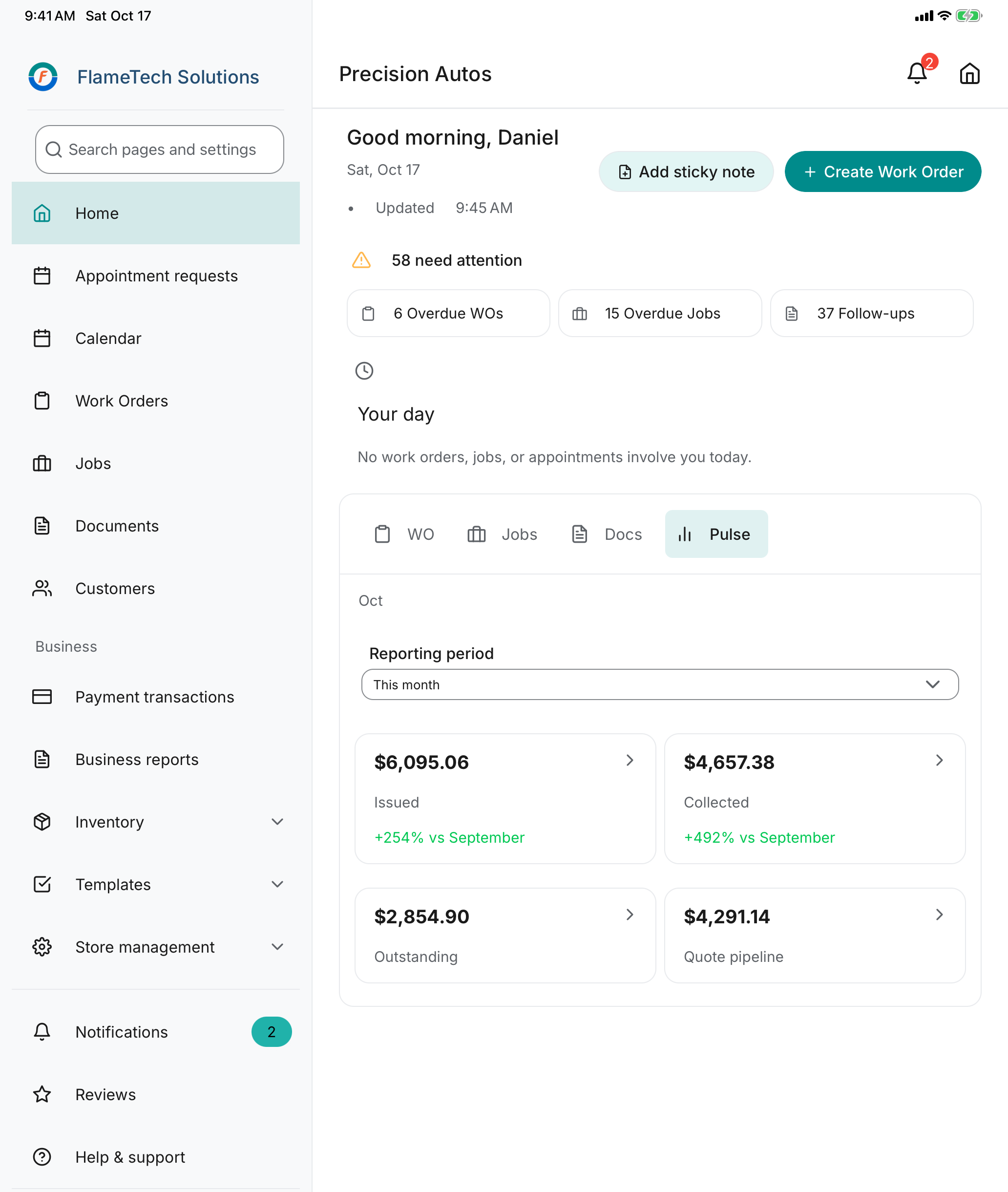
The owner sees the whole shop’s day. -
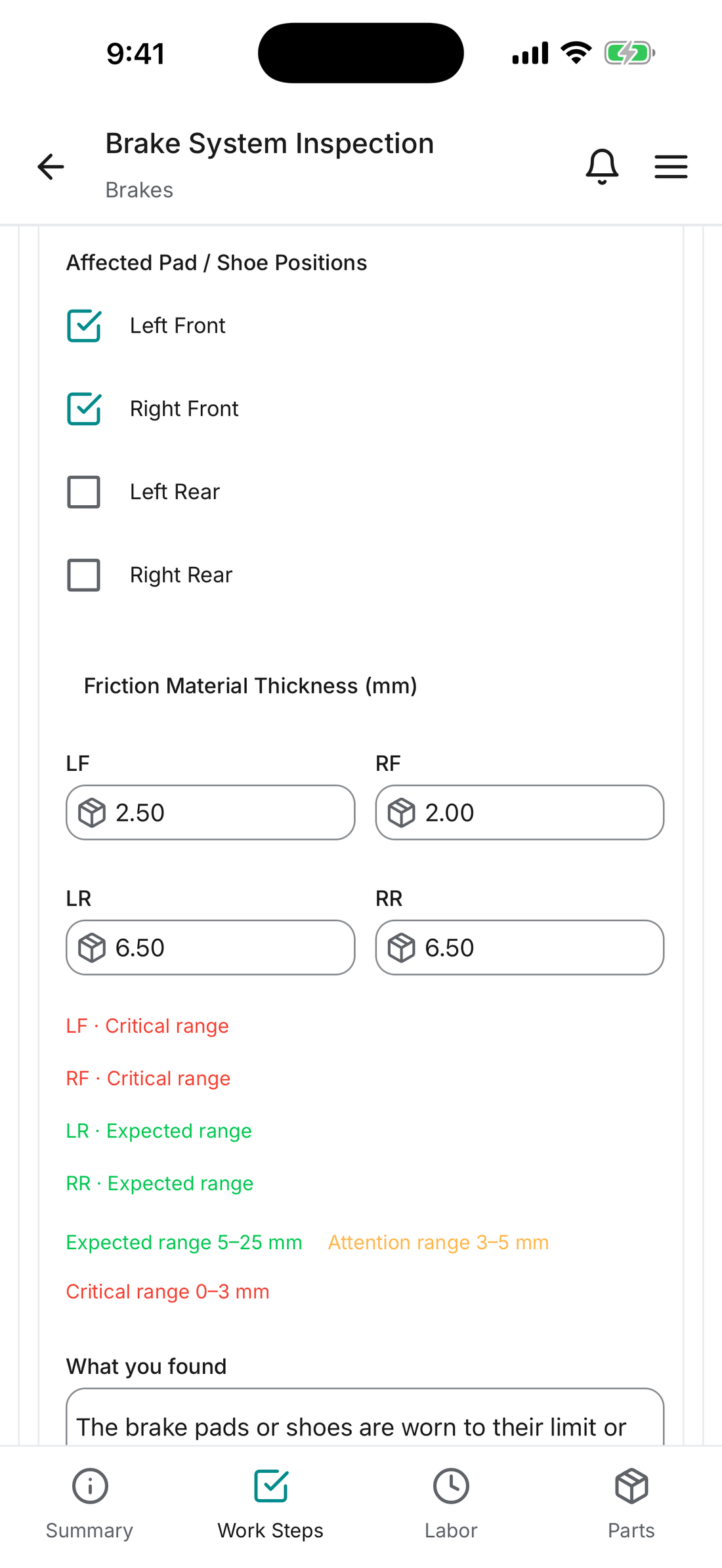
The measurement the technician records at the car. -
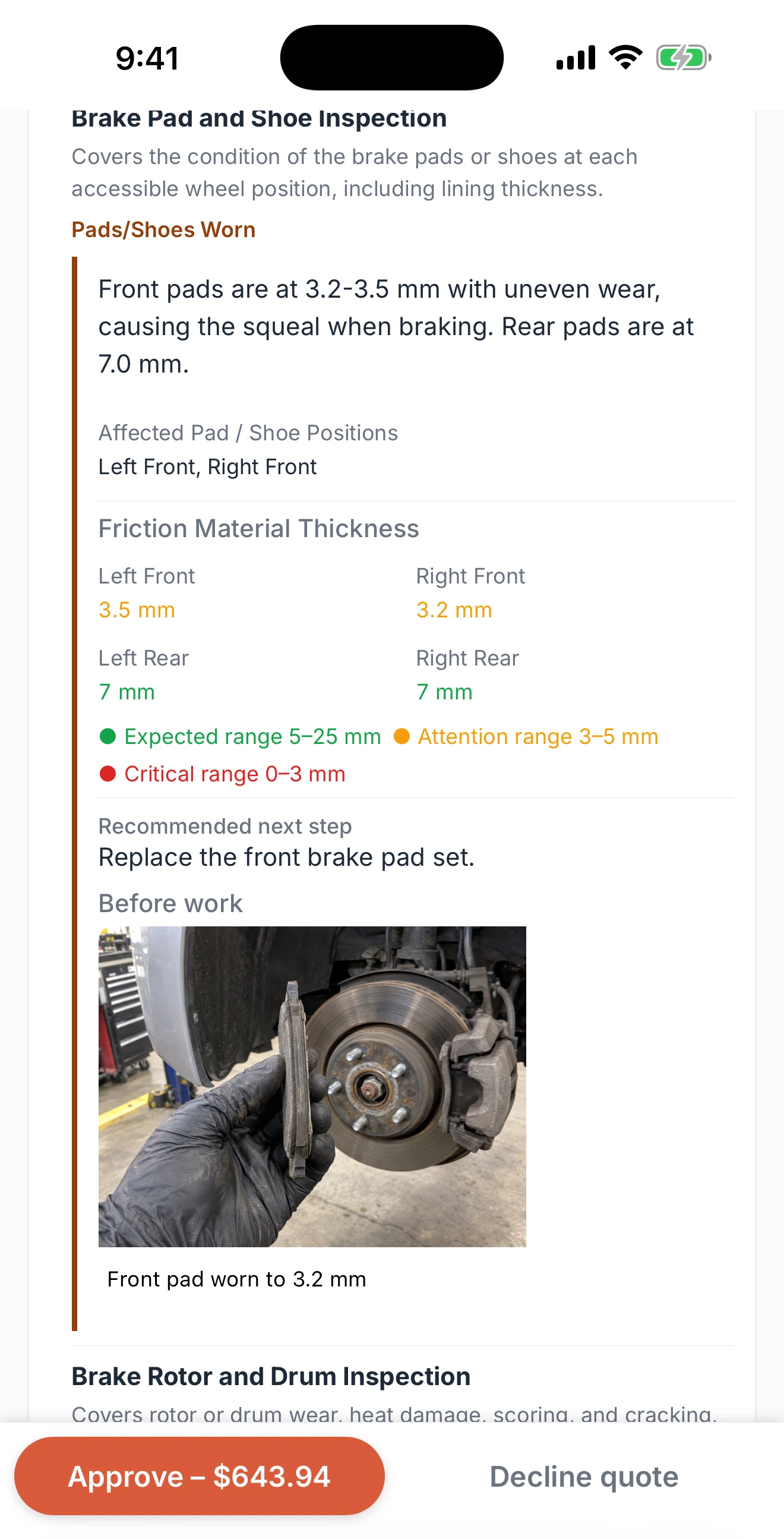
The evidence the customer approves from their phone.
Real app screens with fictional demo records and illustrative demo pricing.
Up and running the same day
Made for a shop run by its owner, with a few people on the floor.
Set up in minutes
Enter your rates, add your team and your first customer, and write the first work order. Job templates and service schedules come ready to use, so there is nothing to build before the first visit. Setup help by email within one business day.
No training sessions
Screens follow the visit, in the order the work happens. A technician taps what is fine and photographs what is not. If your team can use a phone, they can use FlameTech.
Sized for your shop
One plan, unlimited users, no modules to buy. The owner, the advisor and the technicians work from the same record on the counter iPad or their own phones.
One visit, start to finish
Every handoff in one record.
Check in
Customer, what they brought in and the concern in under a minute. Service history and what’s due appear before the work starts.
Inspect
One tap for what’s fine, readings and a photo for what isn’t.
Quote and approve
Findings become lines. The customer approves from a link, no account needed.
Repair
Jobs with steps, parts and labor from your templates, so work is the same every time.
Invoice and plan the next visit
One step to invoice and take payment online. The next due services become the reminder.
Read the transcript
Turn customer concerns into scheduled work.
Technicians capture inspection findings, measurements, photos, and videos using the mobile app.
Build detailed, compelling quotes customers can review and approve from their phone.
Complete the work and attach proof of repair.
Collect online payments with Stripe and sync records with QuickBooks.
Capture customer feedback after every visit.
Set the next service due date and schedule an automatic reminder.
Customers can view vehicle history, see upcoming reminders, and request their next appointment—anytime.
Run your business from anywhere, with full functionality available on mobile and desktop.
Try FlameTech free today.
AI-generated illustrative footage and Cedar narration. Actual application screenshots.
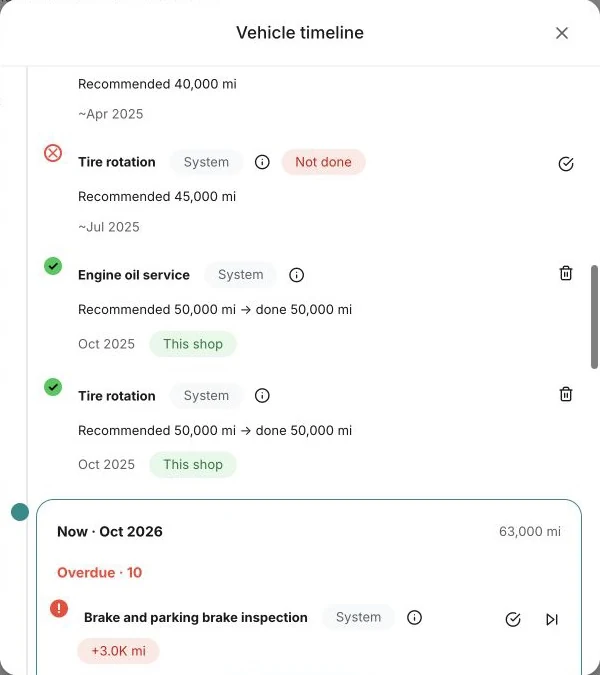
Know what’s due before the work starts.
Every asset has a timeline: what was done here, what is due at today’s reading and what is coming up. The advisor shows it at check-in; the next visit is planned when the work order closes.
Simple pricing
One plan. Your whole team.
Free for 60 days, then $39 a month per shop. Unlimited users. No credit card. No long-term contract. Cancel anytime, effective at the end of the current month.
Start with one service visit.
Set your rates, add a customer and what they brought in, and create your first work order. Follow the getting started guide.
Common questions
How does the free period work?
Every new shop gets 60 days free from the account creation date. No credit card is required to start. Then the plan is $39 a month per shop.
What happens after the free 60 days?
The plan is $39 a month per shop, billed monthly. Cancel anytime, effective at the end of the current month. No notice period, no fee.
What is the founding shop program?
100 shops selected by the founder get 12 months free, then $15 a month per shop instead of $39, locked for three years, plus a setup call and a direct line. In exchange they take a 20-minute call every two weeks for the first two months and let us name their shop after their 20th work order. Apply on the pricing page.
What is included?
One plan. Everything on this site is in it, with unlimited users and no per-user charge. Media storage and monthly allowances are listed on the pricing page.
What does FlameTech not do yet?
Two-way texting with customers, a labor-time guide, parts ordering with live supplier pricing, and running more than one shop location from one account. If one of these matters for your shop, tell us before you sign up.
Is there a mobile app?
Yes. Download FlameTech from the App Store for iPhone and iPad or Google Play for Android. You can also use FlameTech in your browser on a desktop or phone.
Is this built for independent repair shops?
FlameTech supports the work of independent repair shops: customers and what they bring in, work orders, jobs, inspections, estimates, invoices and service history.
Can I service more than one kind of thing?
Yes. Turn on Vehicles, Bikes, Powersports, RVs, Boats or Machines in Store settings, in any combination.
Can I see how it works before signing up?
Yes. Follow one visit on this page, watch the film, or try the interactive demos. No account or booked call is needed.
What is a Job template, and what is a Service Package?
A Job template holds the work steps, parts, labor and the measurements and photos a technician must record. A Service Package groups the Job templates for a service. Apply one to a visit to create fresh work for your team, and share either with other shops.
Can customers pay online?
Yes. Connect your shop’s Stripe account to offer online payment from an invoice link. QuickBooks integration supports syncing financial records after setup. FlameTech adds no fee on payments: you pay Stripe’s standard rate and nothing on top. Stripe and QuickBooks terms apply.
What happens after I sign up?
Start with one service visit: set up your shop details and rates, add a customer and what they brought in, then create the work order. Follow the getting started guide, or ask for setup help.